Contents
Key Takeaways
TL;DR
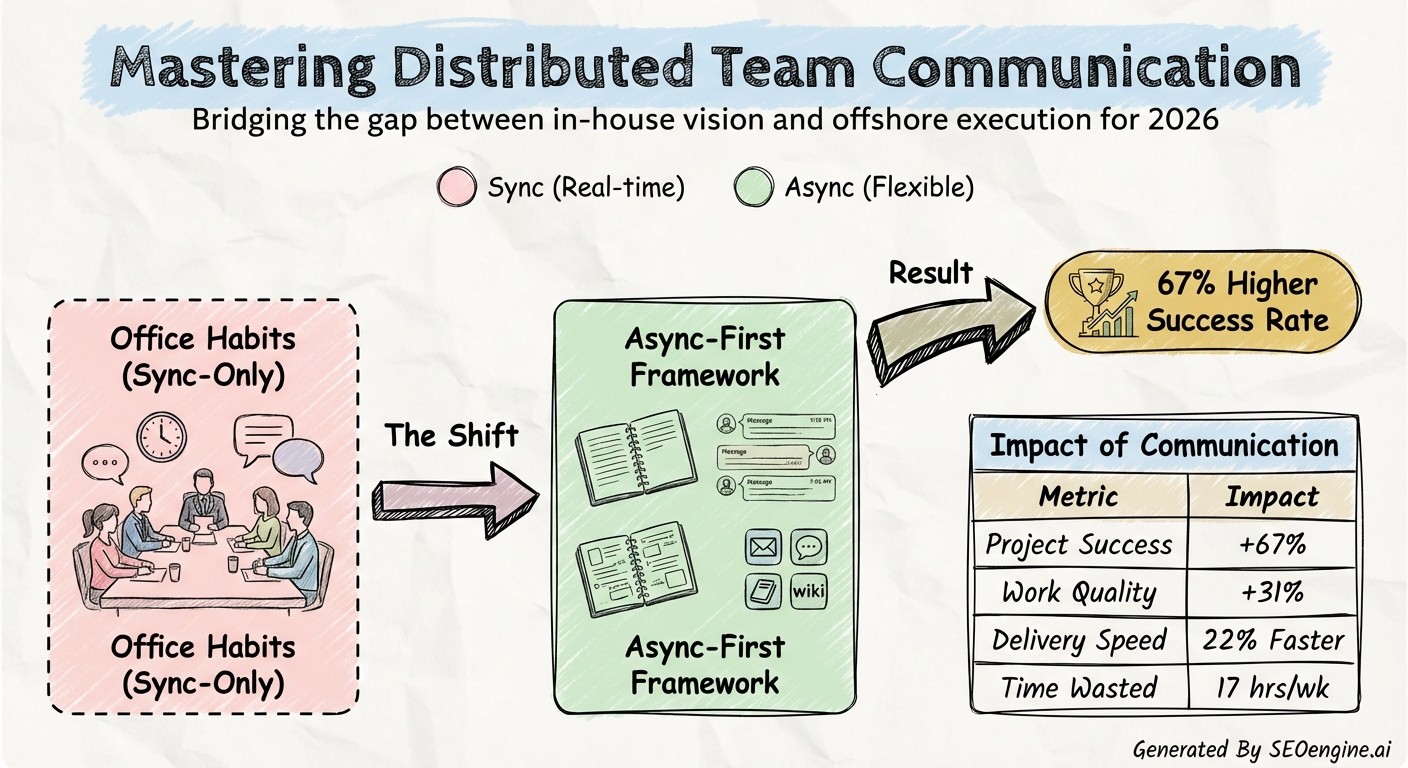
Poor communication costs companies $62.4 million annually on average, making it the single biggest obstacle for distributed development teams.
Founders of software development agencies face unique challenges when managing remote developers across time zones, but teams with strong communication finish collaborative work 22% faster and produce 31% higher quality output.
This guide reveals 10 proven communication practices that will transform your distributed team from scattered to synchronized, helping you ship code faster while building stronger connections across continents.
Key Takeaways:
Communication structure matters more than geographic proximity for distributed team success
Asynchronous workflows with strategic synchronous windows balance flexibility and alignment
Documentation transforms from bureaucracy to survival tool when teams span time zones
Intentional culture-building creates connection that sustains remote relationships
Continuous measurement and iteration improve communication effectiveness over time
Best Communication Practices for Distributed Development Teams
Why Communication Makes or Breaks Your Distributed Development Team
You've hired talented developers across three continents. Your team has the skills, the tools, and the motivation to build something remarkable. Yet projects drag on, deadlines slip, and frustration builds.
The problem isn't your team. It's how they talk to each other.
According to a 2025 survey by Pumble, 86% of employees and executives blame project failures on inadequate teamwork and poor communication. For distributed development teams, this challenge multiplies exponentially.
Communication must be rigorously planned and executed because this is the only way to minimize risks and conflicts to achieve the project objectives. When your team spans multiple time zones, you can't rely on hallway conversations or quick desk drop-bys to resolve blockers.
The difference isn't geography, it's communication structure. Teams separated by 12 hours can work flawlessly, while teams just two hours apart fail miserably. The deciding factor is intentional communication systems that respect distance, honor different working rhythms, and keep people connected to purpose and each other.
Just as Utkrusht AI recognizes that accurate technical evaluation requires structured, transparent processes rather than ad-hoc assessments, distributed team communication demands the same level of intentional design and verifiable proof-of-work.
10 Best Communication Practices for Distributed Development Teams
1. Build Communication Infrastructure Before Your First Hire
Set up communication infrastructure BEFORE developers start, or spend their first month firefighting confusion instead of shipping code. This isn't optional preparation, it's the foundation of everything that follows.
Essential infrastructure components:
Primary communication hub: Slack or Microsoft Teams with dedicated channels organized by team location and project
Video conferencing: Zoom or Google Meet with cloud recording for team members who miss live sessions
Async documentation: Notion or Confluence for technical specs, architectural decisions, and project documentation
Project management: JIRA or Asana configured for multiple time zones with clear task ownership
Code collaboration: GitHub or GitLab with branch protection rules and mandatory code review requirements
Establish 4-hour response expectations for non-urgent communications. This simple guideline eliminates the anxiety of wondering when someone will respond while preventing the "always-on" culture that burns out remote workers.
Building this foundation mirrors how Utkrusht AI structures its technical assessment platform. Before candidates ever begin an evaluation, the system has established clear expectations for transparency, accountability, and verifiable performance data.
Your communication infrastructure should similarly create visibility and proof-of-work from day one, ensuring that team members understand how information flows, where decisions get documented, and what response standards apply across time zones.
2. Master Asynchronous Communication as Your Default Mode
The tyranny of the synchronous meeting has destroyed more distributed teams than any other single factor. When your calendar fills with calls scheduled for someone else's morning and your midnight, resentment builds fast. The solution isn't more meetings, it's fewer, paired with communication systems that work across time.
Asynchronous communication is a key to remote teams. It offers flexibility across time zones and work schedules, allowing them to work without the pressure of instant replies.
Async communication tools that work:
Email: Gmail for Business or Microsoft Outlook for formal updates and information that doesn't require immediate response
Threaded messaging: Slack threads or Twist for organized conversations that team members can review later
Video messages: Loom for explaining complex concepts or providing detailed feedback without scheduling a meeting
Documentation platforms: Notion, Confluence, or Google Docs for decisions and specifications that need permanence
Written communication becomes your primary currency in distributed work, which means the quality bar rises significantly. Every message should be clear, complete, and actionable.
Close every message with a clear call-to-action specifying what action is needed, by whom, and by when. This precision eliminates the endless back-and-forth that consumes hours across time zones.
3. Establish Clear Communication Protocols Everyone Follows
For distributed teams, strong communication isn't optional, it's foundational. But foundation requires structure. Without documented protocols, each team member invents their own system, creating chaos instead of clarity.
Your communication protocol should define:
Response time expectations: 4 hours for Slack messages during work hours, 24 hours for emails, immediate for critical production issues
Channel purpose: When to use Slack versus email versus project management comments versus video calls
Meeting guidelines: Required versus optional attendance, agenda requirements, recording policies
Documentation standards: What gets documented, where it lives, who maintains it
Escalation paths: How to flag urgent issues without creating false alarms
Create a policy for distributed team communication that includes a mix of synchronous and asynchronous tools, clearly defined response time expectations, and guidelines on which channels to use for different types of communication.
These protocols eliminate the mental overhead of deciding how to communicate. Your developers spend less energy figuring out where to post a question and more energy solving technical problems.
4. Schedule Strategic Overlap Hours for Real-Time Collaboration
Define overlapping "core hours" for real-time collaboration and use asynchronous tools for everything else. This practice gives you the best of both worlds: scheduled synchronicity when it matters and asynchronous freedom the rest of the time.
For teams distributed across continents, finding overlap requires creativity and flexibility. A team spanning San Francisco, London, and Bangalore might establish core hours from 8:00 AM to 10:00 AM Pacific Time, a window that captures late afternoon in London and early evening in Bangalore.
What to accomplish during overlap hours:
Daily standups or weekly syncs that require full team participation
Pair programming sessions for complex technical problems
Architecture discussions that benefit from real-time debate
Sprint planning and retrospectives
Quick unblocking conversations that would drag on async
A four-hour question delay costs an entire day when you factor in timezone handoffs. Strategic overlap hours prevent these cascading delays by creating guaranteed windows for synchronous resolution.
Outside these hours, team members work independently with full autonomy. This clear boundary prevents the expectation of constant availability that leads to burnout.
5. Document Everything Like Your Team's Success Depends On It
Clear documentation prevents bottlenecks when teams can't be online together. In distributed teams, documentation isn't bureaucracy, it's survival.
Fortune 500 companies stand to lose an average of $12 billion annually due to the inefficiencies and productivity challenges stemming from unorganized and cumbersome documentation. Your agency might not operate at Fortune 500 scale, but the principle holds: poor documentation destroys distributed team performance.
What requires documentation:
Architectural decisions and the reasoning behind technical choices
Setup instructions for local development environments
API specifications and integration patterns
Deployment procedures and rollback processes
Incident post-mortems and lessons learned
Project requirements and acceptance criteria
Team processes and workflow guidelines
Creating a centralized knowledge repository and fostering concise and up-to-date documentation practices using version control systems for collaboration and facilitating regular knowledge-sharing sessions transforms documentation from static text into living knowledge.
Tools like Confluence, Notion, or GitBook work well as centralized repositories. The specific platform matters less than the discipline of actually documenting critical information.
6. Run Efficient Standups That Respect Everyone's Time
Traditional 15-minute daily standups don't translate well to distributed teams. Around 60% of remote workers experience "Zoom fatigue" or exhaustion from frequent video calls.
The solution? Asynchronous standups using tools like Geekbot, Standuply, or Status Hero that integrate directly with Slack.
How async standups work:
Bot asks each team member the same questions: What did you complete yesterday? What are you working on today? What's blocking you?
Team members respond when they start their workday, regardless of time zone
Responses post to a dedicated Slack channel where the entire team can review updates
Critical blockers get addressed during overlap hours or through direct communication
Weekly patterns become visible without requiring everyone to attend live meetings
For critical situations requiring face-to-face discussion, schedule focused sync meetings with clear agendas. Micro-meetings are perfect for tackling issues fast with short, focused sessions.
7. Over-Communicate Status, Progress, and Blockers
You can't see distributed team members working. Communication becomes your only proof of progress. This reality demands a fundamental shift in how developers share information.
In co-located offices, visual presence signals activity. You see someone at their desk, focused on their screen, and assume they're making progress. Distributed teams lose this ambient awareness.
The solution isn't surveillance software or productivity tracking, it's intentional over-communication of status.
What over-communication looks like:
Updating ticket status in your project management tool throughout the day
Posting progress updates in relevant Slack channels, especially when completing milestones
Flagging blockers immediately rather than waiting for someone to ask
Sharing context when you'll be unavailable or working on something different
Celebrating wins publicly so the entire team sees forward momentum
This practice isn't about micromanagement or distrust. It's about creating visibility that enables coordination. When everyone knows what everyone else is working on, duplicate effort disappears and collaboration becomes natural.
Similar to how Utkrusht AI creates transparency through video-recorded coding sessions that show exactly how candidates approach problems and use tools, distributed teams need clear visibility into work patterns and progress. This transparency builds trust across geographic boundaries and enables teams to coordinate effectively without constant meetings or check-ins.
8. Choose the Right Communication Tool for Each Situation
The most successful remote development teams avoid tool proliferation by selecting a core stack of 3-5 primary tools that cover all essential communication needs. Too many tools create fragmentation and confusion. Too few force awkward compromises.
Communication tool selection matrix:
Communication Type | Best Tool | When to Use |
|---|---|---|
Quick questions | Slack/Teams | Informal queries, clarifications, casual updates |
Formal updates | Weekly summaries, stakeholder communications, formal documentation | |
Visual explanations | Loom/Video | Complex technical walkthroughs, code reviews, design feedback |
Real-time collaboration | Zoom/Google Meet | Pair programming, architecture discussions, sprint planning |
Code-specific discussion | GitHub/GitLab | Pull request comments, code reviews, technical implementation details |
Project tracking | JIRA/Asana | Task management, sprint planning, progress tracking |
Knowledge sharing | Confluence/Notion | Documentation, processes, technical specifications |
Popular choices include Slack or Microsoft Teams for communication, Jira or Trello for task management, and Zoom or Google Meet for meetings. The right toolset depends on your company size, workflows, and security requirements.
Integration matters as much as individual tool selection. Your communication platform should integrate with your project management system, which should integrate with your code repository. When information flows automatically between systems, manual updates decrease and accuracy increases.
9. Build Team Culture Deliberately, Not Accidentally
Social connection doesn't happen by accident in distributed teams. Without water cooler conversations and shared lunches, relationships require intentional cultivation.
Companies with strong remote cultures experience higher employee retention rates (up to 25% higher than industry average), increased productivity (reported 13% performance increase in fully-remote developers), greater job satisfaction (87% of remote developers report improved work-life balance), and enhanced collaboration and innovation.
Deliberate culture-building practices:
Virtual coffee chats: Random pairing of team members for casual 30-minute video calls
Team celebrations: Public recognition of wins, launches, and personal milestones
Interest-based channels: Slack channels for hobbies, local meetups, or shared interests beyond work
Annual or bi-annual meetups: If budget allows, gathering the team in person once or twice a year creates bonds that sustain remote relationships
Collaborative retrospectives: Regular team reflections on what's working and what needs improvement
Developing cultural intelligence is important by understanding that people come from all walks of life, each with unique perspectives, habits, and work styles. As a leader, you need to acknowledge these differences and appreciate/respect them and educate yourself about diverse cultures, customs, and communication styles.
Culture isn't ping pong tables and free snacks. For distributed teams, culture means psychological safety, clear expectations, mutual respect, and shared commitment to both excellence and work-life balance.
10. Measure Communication Effectiveness and Iterate
64% of business leaders believe effective communication has improved their team's performance. But belief requires validation through measurement.
Communication health indicators:
Response time metrics: Average time from question to answer in different channels
Meeting efficiency: Ratio of meetings with clear outcomes versus meetings that could have been emails
Documentation usage: Number of searches in your knowledge base and most frequently accessed docs
Sprint predictability: Percentage of sprint commitments completed on time (communication problems show up as missed estimates)
Team satisfaction: Regular pulse surveys asking specifically about communication clarity and effectiveness
Track these metrics monthly, not daily. Communication patterns emerge over time, and excessive measurement creates surveillance anxiety rather than improvement insights.
When metrics reveal problems, investigate root causes through team conversations. Maybe response times are slow because notification settings are creating message overload. Maybe meetings lack outcomes because agendas aren't required. Maybe documentation goes unused because it's hard to find or outdated.
Your measurement goal isn't to find problems, it's to identify opportunities for iteration. Treat your communication system like your codebase: continuously refactor for clarity and performance.
How Distributed Development Team Communication Compares Across Approaches
Approach | Flexibility | Team Alignment | Onboarding Speed | Best For |
|---|---|---|---|---|
Synchronous-first | Low [X] | High [CHECK] | Medium [CHECK] | Teams in similar time zones with preference for real-time collaboration |
Asynchronous-first | High [CHECK] | Medium [CHECK] | Slow [X] | Globally distributed teams with minimal time zone overlap |
Hybrid (recommended) | High [CHECK] | High [CHECK] | Fast [CHECK] | Any distributed team willing to invest in structured communication |
Ad-hoc (no structure) | High [CHECK] | Low [X] | Very Slow [X] | Small teams (under 5) in early formation stage only |
Key Points
Successful distributed development teams don't communicate more, they communicate better through structure, intention, and continuous improvement:
Build your complete communication infrastructure before hiring your first remote developer to avoid confusion that costs weeks of productivity
Default to asynchronous communication for most interactions, reserving synchronous meetings only for situations requiring real-time discussion
Document architectural decisions, technical specifications, and project requirements like your team's ability to function depends on it, because it does
Establish 2-4 hour daily overlap windows for time-critical collaboration while respecting team members' work-life boundaries outside those hours
Measure communication effectiveness through response times, sprint predictability, and team satisfaction surveys to identify improvement opportunities
Comparison: Synchronous vs. Asynchronous Communication for Development Teams
Factor | Synchronous Communication | Asynchronous Communication |
|---|---|---|
Time zone flexibility | Low [X] - Requires coordination across zones | High [CHECK] - Team members respond on their schedule |
Deep work preservation | Low [X] - Constant interruptions | High [CHECK] - Uninterrupted focus periods |
Decision documentation | Low [X] - Decisions lost without manual recording | High [CHECK] - Written record automatically preserved |
Immediate problem solving | High [CHECK] - Real-time discussion and resolution | Low [X] - Delays while waiting for responses |
Relationship building | High [CHECK] - Face-to-face connection | Medium [CHECK] - Requires intentional effort |
Meeting fatigue | High [X] - Zoom exhaustion common | Low [CHECK] - Minimal live meetings |
Communication Tool Categories: What Your Distributed Team Actually Needs
Tool Category | Primary Purpose | Examples | Investment Priority |
|---|---|---|---|
Chat platform | Quick questions, informal updates, team connection | Slack, Microsoft Teams | Essential [CHECK] |
Video conferencing | Face-to-face meetings, pair programming | Zoom, Google Meet | Essential [CHECK] |
Project management | Task tracking, sprint planning, progress visibility | JIRA, Asana, Linear | Essential [CHECK] |
Documentation hub | Knowledge base, technical specs, processes | Confluence, Notion, GitBook | Essential [CHECK] |
Code collaboration | Pull requests, code review, technical discussion | GitHub, GitLab | Essential [CHECK] |
Async video messaging | Explanations, feedback, walkthroughs | Loom, Vidyard | Nice to have [CHECK] |
Visual collaboration | Whiteboarding, diagrams, brainstorming | Miro, Mural, Figma | Nice to have [CHECK] |
Frequently Asked Questions
What's the biggest communication mistake distributed development teams make?
The biggest mistake is treating distributed teams like co-located teams but with video calls added. Teams 12 hours apart work flawlessly while teams two hours apart fail miserably. The difference is communication structure, not geography.
Successful teams build infrastructure specifically designed for distance, including async-first workflows, overlap hours for synchronous collaboration, and documentation that preserves context across time zones. Without this intentional structure, even minor geographic separation creates major coordination problems.
How many hours of time zone overlap do distributed teams really need?
Most high-performing distributed teams establish 2-4 hours of daily overlap designated as "core hours" when everyone is available for real-time collaboration. Define overlapping "core hours" for real-time collaboration and use asynchronous tools for everything else.
Clear documentation prevents bottlenecks when teams can't be online together. During these hours, schedule standups, pair programming, architecture discussions, and urgent unblocking conversations. Outside these windows, async communication handles status updates, code reviews, and project planning. The specific hours matter less than consistency and respect for boundaries.
Should distributed development teams use Slack or Microsoft Teams?
Both Slack and Microsoft Teams work well for distributed development teams. Popular choices include Slack or Microsoft Teams for communication, Jira or Trello for task management, and Zoom or Google Meet for meetings.
The right toolset depends on your company size, workflows, and security requirements. Choose based on your existing tech stack: Teams integrates seamlessly with Microsoft 365, while Slack offers more third-party integrations and arguably better search functionality. The communication protocols you establish matter far more than which specific platform you select.
How do you prevent communication overload in remote development teams?
Remote workers report experiencing miscommunications or misunderstandings more frequently than in-office workers, estimated around 40% higher incidence by some surveys. Combat overload through clear notification policies, dedicated channels for specific topics, and explicit guidelines about response time expectations.
Encourage threaded conversations to keep discussions organized. Designate "focus time" blocks when team members can disconnect from communication tools without penalty. Most importantly, shift default communication to asynchronous so developers control when they engage with messages rather than feeling constantly interrupted.
What communication tools do software development teams need for asynchronous work?
According to GitLab's 2025 Remote Work Report, 78% of development teams now operate across multiple time zones, making async tools essential.
Core requirements include threaded messaging platforms like Slack or Twist, documentation hubs like Confluence or Notion, project management systems like JIRA or Linear, code collaboration platforms like GitHub or GitLab, and video messaging tools like Loom for explanations that don't require synchronous meetings. Integration between these tools eliminates manual updates and keeps information flowing automatically.
How do you build team culture when developers never meet in person?
Social connection doesn't happen by accident in distributed teams. Engagement thrives when you deliberately prioritize it. Create intentional spaces for connection through random coffee chats, interest-based Slack channels, public celebration of wins, and team retrospectives focused on collaboration.
If budget allows, annual in-person meetups create bonds that sustain remote relationships throughout the year. Culture emerges from how you work together daily: psychological safety, transparent communication, mutual respect, and shared commitment to excellence alongside work-life balance.
What metrics show whether your distributed team communication is working?
Track sprint predictability (percentage of commitments completed on time), average response times across communication channels, documentation usage frequency, meeting efficiency ratios, and team satisfaction scores specifically about communication clarity.
Teams with strong communication finish collaborative work 22% faster and produce 31% higher quality output. Your metrics should reveal whether communication enables or hinders progress. Monthly reviews identify patterns and opportunities for improvement without creating surveillance anxiety.
Conclusion
Poor communication costs companies $62.4 million annually on average, but this staggering figure represents opportunity as much as warning. When you implement structured communication practices specifically designed for distributed teams, you transform potential chaos into competitive advantage.
The 10 practices outlined above aren't theoretical concepts, they're battle-tested approaches used by successful distributed development teams worldwide. Build infrastructure before hiring. Default to asynchronous communication. Establish clear protocols.
Schedule strategic overlap. Document relentlessly. Run efficient standups. Over-communicate status. Choose the right tools. Build culture deliberately. Measure and iterate.
For founders of software development agencies, communication excellence separates thriving distributed teams from struggling ones. This aligns with Utkrusht AI's philosophy that accurate evaluation and ongoing success require transparent, verifiable systems rather than assumptions or gut feelings.
Just as Utkrusht AI's real-world watch-them-work tasks and video-recorded sessions establish clear proof-of-skill before interviews, effective communication systems establish clear proof-of-work throughout collaboration.
Your communication infrastructure should create the same level of visibility, accountability, and objective performance tracking that ensures distributed teams function effectively across continents and time zones.
Start by auditing your current communication practices. Which of these 10 practices are you already doing well? Which represent opportunities for immediate improvement? Pick one practice to implement this week, perhaps establishing response time expectations or scheduling your first async standup.

Want to hire
the best talent
with proof
of skill?
Shortlist candidates with
strong proof of skill
in just 48 hours